Posts

Architecture - Blueprint Inventory Part 2: Inventory Functionality, Drag and Drop

Image
One of the implementations I really wanted to add to the inventory system was being able to move the widget around. Drag and Drop operations, as it turns out, aren't as simple as just drag and drop. A whole new BP must be created that will be used by whatever it is you want to drag, and several functions must be overwritten to do so. As mentioned in the previous blog post, I have started this project again, as the backup I had wasn;t totally up to date and it could stand to be a lot more cleaner. If you have been following along, there is a chance some of the variables or blueprints may not be the same. As always, if you read this blog post and would like more information, please view the original tutorial by youtube user " Unreal Gaime Dev " The first step The first thing to be done is to create a new BP with a parent class of "DragDropOperation." There is nothing required in the construction script or the event graph, it simply requires to vari...

Small hiccup, corruption, reworking, see you next week.

Just a quick word - I am in the process of writing up this blog entry, but it should be said that the current version where I had more widget work as well as a merchant has been lost and corrupted. I have kept multiple backups, and have only lost maybe 3, 4 hours work. It's not the end of the world. That being said, when I started this project I really really was clueless. About programming and unreal itself. So, despite being 10 or so hours deep, I have opted to start again. A lot of file structures I had were not simple to find the blueprints necessary, I wasn't properly up to date with unreal and tried moving a lot of assets around which only duplicated a folder because it was still in use in another location, and a lot of the coding and variables read pretty horribly as well. So, with the interest of trying to become a more neater, stricter programmer, I have started fresh! This time, I'm aware of some mix ups with file structuring, I don't have starter content ...

AV - Asset Design, Marketplace.

Image
To top the day off and give the blog a little bit more attention, I want to showcase some of the assets I have been working on. Originally I was working on a more complicated asset for 2 hours every week, however I recently decided to get a lot of the smaller assets out of the way first, as I was finding myself slowly chiseling away at the intended asset list and not having much to show for it. Texturing is still quite a way off, and a lot of these assets are still in a whitebox state. The busiest, most populated level in the project will be the marketplace, which will require a lot of small assets, and a few of these I would like to show off in a blog post! Please bear in mind for the time being these are untextured save for one or two of the assets. Seconded to Crates, Barrels are an easy way to flesh out any level in almost any setting. Many games will have these be destructible or contain loot, but I'm afraid given the nature of my project I'd much rather have them ...

Architecture - Blueprint Inventory Part One [Long Post!]

Image
Unfortunately, every time I screen record, the unreal engine crashes. So, I'm instead going to have to backtrack through what I have already done to try and showcase it in several screenshots instead, so that I can upload a small amount here and there whenever I have added something to the games blueprints! Woo! The following posts will be following an already existing tutorial that I will be talking through, made by user " Unreal Gaime Dev " - Please make sure to watch his tutorials and show him some love, whilst this inventory isn't clean or crisp, it is a very well functioning inventory using physical slots instead of a list. I just got done adding a very very simple currency system that currently isn't used anywhere else in the game, that's something that will come at a later date. Instead of spending two 6-hour days coding, I figured I'll stop until tomorrow and show the blog some love. The screen shot dimensions may be a little off on the ...

Architecture - Blueprint coding an Inventory System

Quick explanation of why there wasn't a blog post last week! I had originally intended to have a video uploaded as there was a lot I wanted to talk about regarding blueprints, and audio design, although the main reason was to showcase the inventory system I had been working on over the previous weeks. Unfortunately, trying to record the inventory system crashes the screen recording equipment and crashes unreal at the same time. I am trying to find a work around, although a lot of the functionality would require gifs or videos. The inventory system at the moment is still a WIP, although it is coming to a close as I start preparations on the crafting widgets and blueprints to start the games core mechanic. Currently, the player can drag and drop the location of the inventory, right click to access a menu of actions, read maps, drink potions, stack items, and sort the inventory by pre-determined categories, as well as discard x amount of the stack of items. A lot of these would be...

Design Documentation - Storyboarding

Image
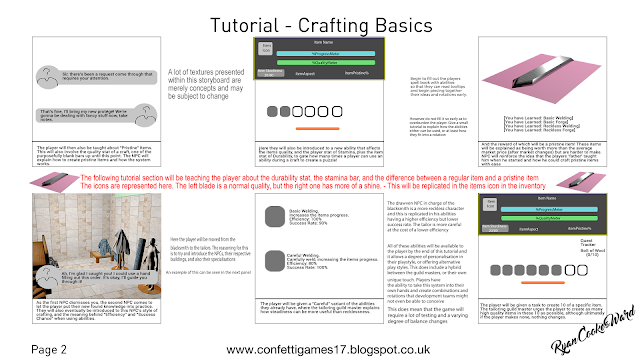
As mentioned in a previous blog post, some time has been set aside for creating a story board that serves more as a concept reminder than a strict story board, however it does detail and annotate the introduction to the game, as well as give a brief look into player psychology and why certain concepts have been chosen. Whilst I could upload the whole storyboard, I could also keep some mystery going by only teasing you with a few select images as well! Project Management Expect to see a video blog entry detailing the blueprints I have been working on in order to create an inventory system! It's not entirely finished but it has a decent amount of functionality and had to be implemented before a crafting system could be put into place.

w/e 22nd Jan - Project End Date Announced

This definitely doesn't bode well for the future of this project, but whilst some parts have been successful and milestones have been met, creating long term milestones is actually pretty challenging.  As an example, just how long exactly should asset production take? How long does it realistically take for level design? Just how populated should the level be? What parts should I be prioritising?  As a game that will be based mainly around its mechanic, just how much can I get away with doing? Or, alternatively, not doing? It's fine creating an amazing in-depth world filled with NPCs each with their own personality, litter floating freely through the streets, but none of that is relevant to my proposed game at all. So to see so many production blogs honing in on level design and artistic elements has thrown my time perception off. I shouldn't need to spend more than a month creating all of these assets to a 4k professional quality. That's not what this game is ab...